
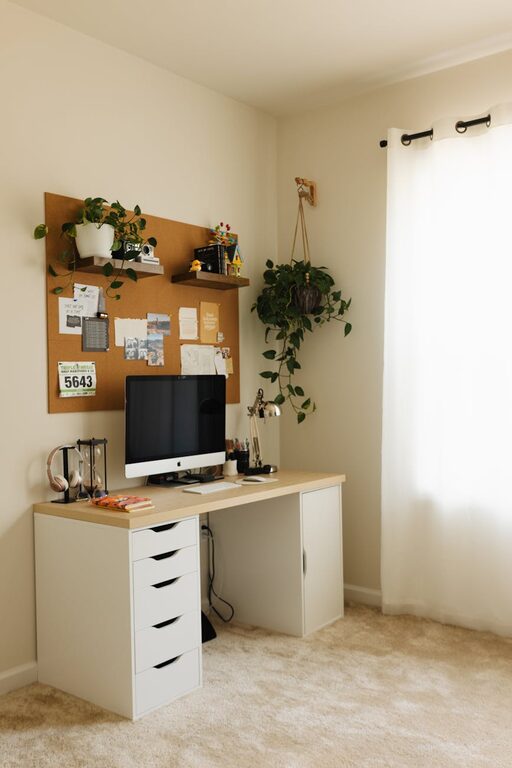
Creating a home workspace that balances comfort and productivity is essential for anyone working or studying from home. A cozy and functional setup can help minimize distractions, promote focus, and make your workday more enjoyable. Whether you have a dedicated room or just a corner in your living area, these tips will help you design a workspace tailored to your needs.
Choose the Right Location
Consider Natural Light
Whenever possible, set up your workspace near a window to take advantage of natural light. Sunlight not only helps reduce eye strain but also improves mood and energy levels. If your space doesn’t get much natural light, invest in quality lighting options, such as a desk lamp with adjustable brightness.
Minimize Distractions
Pick a quiet spot away from household noise and heavy foot traffic. If space is limited, use noise-cancelling headphones or a white noise machine to create a focused environment.
Invest in Comfortable Furniture
Ergonomic Chair
A good chair supports your posture during long hours at the desk. Look for adjustable height, lumbar support, and comfortable cushioning.
Suitable Desk
Choose a desk size that fits your space and work needs. Standing desks or adjustable desks can be great options to shift positions and reduce physical strain.
Add Supportive Accessories
Consider using a footrest, monitor stand, or keyboard tray to enhance your comfort and reduce repetitive stress injuries.
Organize Your Space Efficiently
Declutter Regularly
A clutter-free workspace reduces stress and helps you focus. Keep only necessary items on your desk and store the rest in drawers or shelves.
Use Storage Solutions
Incorporate shelves, filing cabinets, or desk organizers to keep papers, office supplies, and gadgets neatly arranged.
Lean on Technology
Use cable management tools to avoid tangled cords. Digital tools like calendars and to-do list apps can also help keep your work organized.
Personalize Your Workspace
Add Cozy Elements
Include soft textures like a small throw blanket or a cushion on your chair to add warmth and comfort.
Bring in Plants
Indoor plants improve air quality and introduce a calming natural element to your space.
Decorate Thoughtfully
Choose artwork, photos, or inspirational quotes that motivate you without creating visual clutter.
Maintain Healthy Habits
Take Breaks
Set a timer to remind yourself to stand up, stretch, or walk around every hour to avoid fatigue.
Keep Hydrated and Nourished
Keep a water bottle nearby and plan healthy snacks during your workday.
Set Boundaries
Establish a clear start and finish time for work to maintain work-life balance, especially in a home environment.
Optimize for Your Work Style
Identify Your Workflow Needs
Think about whether you need ample surface area for papers, multiple monitors, or specific tools depending on your profession.
Flexible Layouts
If you share your workspace or use it for multiple purposes, invest in modular furniture that can be rearranged easily.
Final Thoughts
Creating a cozy and functional home workspace doesn’t require a big budget or a large room. By focusing on comfort, organization, and personalization, you can design a space that supports your productivity and makes working from home more enjoyable. Small adjustments, like better lighting or ergonomic furniture, can make a significant difference in how you feel and perform throughout the day. Take time to experiment and find what works best for your unique needs.